Sunday, October 11, 2009

WebDT 366, and beyond the stars.

Ive given up any hopes in hell to make a mating connector for my WebDT 366 IDE Flashrom Board, so I ripped out the 2mm pin header which is only half height. Surprisingly it was quite simple! Back breaking, tedious, and utterly mind-numbing, but I think many people can do it, granted they are comfortable with a soldering iron. Seeing how I had a busted IDE cable from previous attempts to get an IDE cable modded and working, I chose to solder the cable directly into the motherboard. Yeah... dont do that, major pain in the ass. You can easily install a normal height 2mm header so you can use a regular IDE cable. From there you can use almost any style IDE drive you want to use. ALMOST ANY IDE DRIVE!

The WebDT 366 IDE bus is limited to 3.3V drives, and no more than 350mA or so. I havent tested it exactly how much amperage it can handle. 300mA drives work fine, my CF cards are rated fr that, 500mA does not. Now we can "borrow" power from the USB port, but with my current direct-wire hookup, its not easy to disconnect the +3.3v lead from the board. After all, we dont want to directly hook something that can handle more voltage and amperage into the IDE +V line, now do we? NO! We do not! Of course the first thing that comes to mind is USB. Granted I think the USB on the WebDT is useless beyond text/mouse input, the dock does have some USB lines I will have a very unlikely chance of ever using. I can/will mod some of my IDE to CF afapters, and 44 pin to 1.8" IDE (aka iPod Drive) adapters so they directly take power off of the USB on the interna cradle connection, which leads to a 2mm pin header anyways. The mod will be pretty simple in general, granted you can grasp the general concept.


This is the general idea. Compact Flash drives work, but they are somewhat slow in PIO only modes. I used a 6GB microdrive that detected, but it drew 500mA (labeled on the drive itself) and I had major issues with what seemed to be random power brown-outs. Here is a stock install of XP Pro 2 with the themes pulled out, and some very minor optimizations. The OS still needs some work, but thats a matter of personal preference and wont really get into it.

Now for something kinda' cool. You may or may not know, I am into ham radio. Not the typical two fat fucks talking over a static repeater link about local news, weather, and bowel movements. There is a LOT more to the hobby. One of them being Slow Scan TV. Its is a method of encoding digital images into an analog signal and transmitting it over a radio carrier. Its like TV... but slower.. get it.. SLOW Scan TV (SSTV from herein).

SSTV was used on many space missions for imaging, and I am talking back in the 1960's. Technology has improved just a wee bit over the past few decades. Getting the hardware to get SSTV going isnt all too taxing in general. I loaded up MMHAMSOFT's SSTV software on my friend Ugster's WebDT, and on my laptop (for now, I dont have the right audio connectors) hooked into my Handheld Radios (HT Radio). One is a cheap $60 FD-460A 70Cm band (440Mhz) and the other is a Yaesu FT-60 dual band (google it). With some basic audio patch cables and software set up, we started sending some images.

The image is actually a macro shot of my eye using a Playstation 2 Eyetoy USB Webcam with drivers hacked to be used under windows, and a red LED for a backlight. The radio as stated is an FDC-460A

Sunday, October 4, 2009

Why longer isnt always better.

I know I dont post often, I am sorry. I am not in the lifestyle of ending my adventures in the electronic wilderness with a post about it. I prefer to collect my thoughts and proceed with the next phase of progress. Which comes to mind, the RM4100 is not forgotten! It will be finish after I tie up some loose ends!

I have been fighting with my Web DT366 quite a bit, I enjoy this little fucker. Granted it has some handicaps when it comes to the USB, and inability to boot from onboard Compact Flash (herein referred to as CF) with the internal connector. This is what I have been up to


The one major crippling issue of the WebDT was its USB 1.1 to load an OS from, and the 512MB FlashROM Board. The USB 1.1 is totally useless to run a live OS distro, no matter how small it may be. Now I have tried and tried some more, using every tech trick inside my e-Hat to get a way t hook another drive to this bus so we can use a more enhanced OS. Im no looking for OSX or Vista, but something thats usable in general, and not so stripped down it barely does the task you want it to do, say... scan for wifi, map networks, control head for your home automation and A/V gear. This lil' buggar has alot of potential, but the lack of storage is a major Achelie's heel.

In essence this is a regular IDE bus, 44 pin header. But here is the catch, its half hight We cant plug into it with a regular connector, and I havent found one that could fit so far. Since my last post about the Web DT I have been corresponding with Molex, whom makes similar connectors. I thought I finally kicked the WebDT int the nuts and made it my subservient anime school-girl bitch. Molex was QUITE helpful for sending me countless samples oh pin headers to line up and get mated into this motherboard.

It turns out the motherboard uses a standard 44 pin ~ 2mm spacing on the PCB itself. This is a throughhole component, all the connectors I have are SMD, assuming the board was in fact - SMD - and here I am like a schmuck looking at this through-hole header. Sick of waiting, and with the essence of a hacker, I make due with what I have.

*I DO NOT RECOMMEND DOING THIS UNLESS YOU HAVE VERY GOOD SOLDERING SKILLS!! ~ YOU HAVE BEEN WARNED!*
[PICS Will be added later]

I attempted to sand a 44 pin IDE Cable for laptops to be half height to fit over the connector. This failed because most of the pins did not make proper connection. This took a week of trial an error before it took a total nosedive into the utter end of total-fail! I cut the remaining connector off, which wasnt much by the time I was done by the end of the mod, to be left with a cable that had one working crimped 44 pin IDE end, and a nice length of ribbon cable.

I then spliced each wire, and then tinned them, prepping them to be soldered directly to the motherboard in the through-hole pads. Thing here is, however, there was already a connector in place. What I had done was *gently but firmly* clamp the board in place, then proceed to work. Using a typical 35W iron with decent tinned tip, I held it on the pad holding the pin, and with a pair tweezers (or other fine tipped tool for grabbing small tings) pulled the pin out. I pain painstakingly removed all 44 pins, then pulled the plastic layering off. No glue, it just popped right off with no issues. I cleaned up the remnant of solder that were in the through-holes with some cheap desolder braid. It was surprisingly easy! I didnt have a single issue with any of the through-hols at all. It was just very tedious and pain staking in my back and neck

The board is clearly marked Pin 1,2, 43, and 44 for reference, No Guesswork here! Always a plus! I prepped the IDE cable I destroyed, the header was gone from excessive sanding in shy hope of getting it to natively fit with the now missing connector. I pulled he wires apart a wee bit, spliced, and GENTLY pre-tinned them with solder. Sorry, no amazing pics there. Nothing too exciting to see, I got all the pins soldered in place as neatly as possible [Pics to come, next time I pull the DT apart].

Now here is the important part! The Web DT366 uses a through-hole 2mm pin header! It does NOT use a SMD or multilayer pin header. You can easily salvage or buy (or claim free sample) proper pin headers, and solder it in place, that is if you dont want to take the pain-mistaking long amount of back breaking work to get the IDE cable directly soldered in. I will order some proper headers from molex as soon as I can to mod my other DTs.

Now with any IDE cable or header mods done you will need mods done to the WebDT. This is one of many options. When I get the others completed (for friends) I will post results.

Now that we have a working IDE interface its time to get an OS installed. As previously stated in earlier posts, the WebDT can boot from USB Optical Drives, or USB Multboot. Now I have had more luck with the optical drives, but if you want to do the USB Multiboot method, by all means feel free to try. If you come into a 0x0000007b Blue Screen of Death Error, you have issues with the IDE Controller Drivers. Take nLite out for a date ad perhaps a nice movie and you will get lucky. Works for me. Still being you are installing whatever OS from USB 1.1, my case being XP Pro SP2 Corp', its going to take some time, so be patient. Of course there are some MAJOR optimizations to me made in the OS, and where to get proper OS drivers, but thats for another post.

Here are some critical findings about the IDE so far:
  • Compact Flash (mine is 133x and says it supports IDE modes) only does PIO mode, which is VERY SLOW! It is comparable in speed to the onboard 512MB IDE FlashROM Board. Definitely not the fastest thing to be running an OS from,
  • The IDE bus supplies a 3.3V line, with very low amperage. I have not measured (the amperage) it, but it gets into my next point.
  • If you choose to use a Microdrive, although 44 pin to CF adapters exist, the WebDT IDE bus cant push out enough amperage to power the drive. It will detect, but encounter errors or IRQ conflicts (OS Dependant) during install. I am working on a fix for this, so you better brush up on your soldering skills!

  • 1.8" IDE derives, or also known as 'iPod Hard Drives' or 'ZIF Hard Drives will give the same issue as microdrives, however...!

  • The typical IDE chain runs at 5V, the 1.8" ZIF Drive runs at 3.3V. I had modified the adapter board replacing the onboard surface mount regulator with a bare wire (the small 4 pin black rectngle ting at the top of the board) allowing the WebDT 3.3V Rail to power the drive... again there is no way to get enough amperage to the HDD, and your OS will return an error. There is a fix for this that I will attempt. That is to snip the +V rail of the IDE pin on the male header of the drive adapter, and solder a wire to a known +5V source, perhaps some unused USB Bus ports un he WebDT 366 Dock. USB will give 5V at 500mA. More than enough to power the 1.8" HDD. The 5V though, not good... I will have to wire the 5V from USB into the onboard regulator, but disconnect the +V pin on the adapter header so we arent crossing the USB +5V line into the IDE +3.3V Line. Sounds hard, but it shouldnt be. Ill cut the physical pin on the header, remove it completely, then solder in the +5V needed that will be plugged into a very and utterly useless USB header on the bottom dock connection. As long as the new +5V line doesnt attach to the onboard IDE 3.3V rail, all will be well.

So far I have full non-nlite XP running from an 8GB x133 CF card with minimal tweaks.No Themes, running in classic mode, turned off Indexing, turned off Restore points. adjusted the Pagefile a bit, turns off all animations and graphical embellishments; although I did keep in Common tasks. Graphics, sound, touchpanel work, need to get my PCMCIA wifi card working,but thats the last on the list. I need to go and do tons of service patch updates and install my USB wifi cards, WiSpy, and other little doo-dats.... K-Melion, PUTTY, Kismet, inSSIDer, Channelizer, VLC, Winamp 2.7x, WinRar, nMap, audacity, Scanner Recorder... just to name a few.

I am not taking this Install too serious as I will be running nLite across this for a custom install in general, and I need to get better Penmount support, and the Button Agent working. Button Agent isnt exactly open and downloadable, so I need to get a copy...somewhere. Maybe a decent On Sceen Keyboard would cool, but I cant find any that dont blow. I have a bluetooth keyboard, perhaps, or maybe interface my Erickson Chat board into the unused serial port on the Motherbard... Or even a mini USB, I have a few of those. Would be nice to make a Chorded Keyboard wit Flexstrip sensor interface, but not I am going beyond the topic of this post.

Ill try and post more about my hobbies and general works more often, I promise.

Friday, April 10, 2009

WebTV RM4100 Update on the down-low

Turns out my suspicion of the Web TV's new BIOS Socket being the main cause for failure. I removed the socket and in the process it was utterly destroyed. I Soldered the original BIOS back in place and the unit is back to its regular function. I lost my two other programmed chips, but no worries, I have a few spares. I'm pretty sure the BIOS I am working on will be what we need to boot the unit as a PC, with a few missing features, but I think the OS and a little iron time will fix those.

So YAY! The WebTV 2 is back to life!

Monday, April 6, 2009

Im a slut, and you should be too

I have been doing my typical crap. I have made a lot of progress on the Web TV 2 work, unfortunately the day I decided to install a Windows XP OS on the Dev' unit I have been working on, the bastard decided it didnt want to boot anymore. Im assuming one of two things are wrong, either the BIOS PLCC Socket is bad, or the unit finally bit my hand after all of the solder work ive put it through. I have one more to fiddle with, and 5 more on the way. I was told two of the units are DOA, and three were store retail units, possibly developer units. I might be able to get all of them back to life.

Here are some pics of my progress.


As you can see I have made a bit of progress, and I have been taking my sweet time with it. Just wait, I will be done someday... I am also working on an LPC Flasher for people who dont have one. I just need a competent coder to help me with the software side of things, but one step at a time, eh?


I have also been working on OS Install methods. I wound up getting a good deal on an Asus EEE 900a. Its still running the stock shit xandros OS, but I plan on swapping out to XP Pro. I have been playing with USB multiboot, which allows you to boot from a USB Thumbdrive and install XP. Now, I could be sane and just use Windows XP Pro, but of course I am not. I have been toying with Windows XP Embedded and Windows XP Tablet Edition. Now before you start to bitch "OMFG Why Winblowze!!!" let me remind you that I am not an OS Fanboy. I am choosing Windows for now mainly because of popularity, ease of install, and tech experience level needed for any preliminary hacking. Remember I am doing this as much for myself as I am for other people. If I wanted to be selfish little slut that only thinks inward, I wouldnt be doing most of this work on the OS, posting my research, or explaining anything. I figured this tech-slut can share the info and hope to get others started. Perhaps I could even inspire someone to go beyond my work and do something I cant, which is really why I am doing this.

I also got my hands on a WebDT 366, an embedded tablet. Well, im a slut, so I got 4 of them. Granted 3 of them are for my friends and they are reimbursing me, it still give me a few extra to play with. Here is a little bit about the WebDT so far:

  • AMD Geode GX 500Mhz CPU
  • 512MB onboard FlashROM (some models have 1GB)
  • 256MB DDR 200Mhz RAM
  • PCMCIA (Used for Wifi)
  • Compact Flash (used for... DUH!)
  • USB 1.1 (the 800Mhz model does USB 2.0)
  • Adjustable (max 16MB) onboard shared video
  • Onboard Audio and Microphone with headphone jack
  • Onboard Bluetooth
  • Typical BIOS features
  • Boots from USB, FlashROM, or Compact Flash
This is a recent toy, I have no pictures, and being the technophile I am I have too many projects going on at once. Not to mention I dont blog for shit unless I have to, so dont expect much news on the WebDT right now. So far it boots Windows CE 5 from FlashROM. I have been able to load the USB Multiboot XP Install to get an OS, but the 512MB of storage is very limiting. I need to get my hands on a bigger Compact Flash card. You can enter the BIOS setting by hitting the F1 key on a keyboard when it loads a pale blue screen. I just whail on it like a crack-head maniac. Once in the BIOS it has the typical features. The unit has already loaded a few live Linux distros for me from USB Thumbdrive, I have not had a chance to fix my USB CD-Rom drive but the WebDT can boot from it. Once I get some extra time I would like to backup the internal flashrom since I dont have a WinCE Restore Disc. Once a backup is made I will feel a little more comfortable playing with OS Installations. Yay for linux and the dd command!

It just doesnt stop!! I also got my hands on a pair of MyVue iPod LCD glasses. They are marketed strictly for iPods' however it has a typical 4 pin 3.5MM headphone hookup. They run 320x240, yeah, kinda' low rez, but they look pretty good. They are a lot smaller, lighter, and better quality than my last pair of LCD glasses. The one thing I like about them is the fact that they arent full-field. They dont obstruct your vision completely. They only take up the lower third of your field of vision. One thing I dont like is the design seems to be for someone thats 9 feet tall. The headset will need a headband strap to keep it from falling off my greasy face constantly. I got a damn good deal on them and to be honest I enjoy them. I plan on using them for a few wearable projects, including a smaller slim-line 2.4Ghz wireless Video Scanner currently being worked on.

This is my idea of getting ready for sleep....


Thursday, January 29, 2009

Asus EEE - Where it went wrong

My buddy Mustang wanted an EEE PC, my other buddy was selling his for $150. Me acting as a middle man I was able to work the deal out, so I have had the honor to try out my hacky hands with this contraption. Its currently running a nice clean install of XP Pro Corporate. One thing that really pissed me off is that Asus sold this as a "Laptop for Hackers" but wont let you hack it. At first the violated the GPL License by not releasing proper drivers so you can install your on distribution of linux. They also made it so that replacing or upgrading the RAM or Solid State Hard Drive (SSHDD) voided the warranty. Thats really shitty! How can you tell me I will void my warrenty because I put more standard, off the shelf RAM in the unit? I can understand if I took the whole thing apart and took my soldering iron to the board, but to void it under the pretense that I replace standard hardware... fuck you. It seems they used "Linux Hacker" more as a marketing term than conforming to the Open Source sensibility of homebrew hackers and technophiles alike. This alone made me digress an EEE purchase.

Now, I like the size, but here are some minor gripes, besides the obvious maketing and licence blunders of the past:
  • The touchpad is too small to be remotely useful.
  • The 7" LCD isnt big enough to hold a typical GUI, even a slimmed down GUI.
  • The keyboard is very hard to use without using the 'Hunt and peck' method.
  • Battery... can we please have an official extended battery?
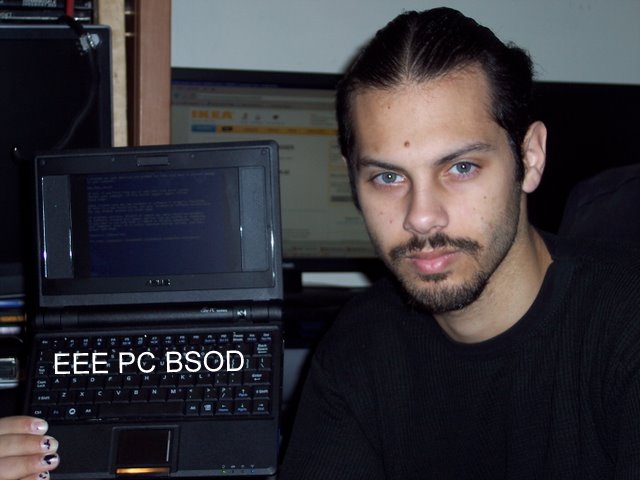
I like the SDHC, right now I have an 8GB card in there. I havent gone to installing linux to SD yet, or to a USB Drive, but with a little tech know-how its not hard at all. If you think GRUB is a type of bug, then you shouldnt even bother with an EEE. I have managed to BSOD the EEE within minutes of using it, but I just have that talent. Seeing how this isnt mine, I didnt really dig into it. Once mustang gets his paws on it, I will surely be by his side ready to sink my claws in.


For productivity, this thing is useless. The screen is too small to hold a standard formatted screen for text editing, and the keyboard is harder to use than a thorn covered butt plug. If you want it for generic mobile bullshit, its great! Add a beefed up wifi card and bluetooth stick, some nice linux software, and you could be a severe threat to anyone roaming the electronic frontier within the immediate area. Or just be a typical myspace/facebook whore... but beyond generic playing, which I must say, I do a lot, I wouldnt buy one at full price, and if I did get one, a 10" screen would be the best one to get if you can.

Once I get this off to mustang and we work on it a bit, I will post some more about the hellish hacks and misadventures of BSoD and friends.

Friday, October 17, 2008

Hacking the cork out of the WebTV 2 RM4100's ass

Yeah, I dont blog. Blow me!

I have an MSN WebTV 2 model RM4100. Not because MSN WebTV is a worth while service, or because I am compelled to e-mail and browse the interweb from my TV, I have an Xbox running linux for that, and that can at least run nmap. The WebTV 2 Model RM4100 runs on all standard intel hardware. Here is some info on it:
  • Intel Celeron 733MHz CPU
  • Intel 830M northbridge
  • Intel 82801DB (ICH4) southbridge
  • SMSC LPC47M192 Super I/O
  • ST M50FW080 8-Mbit (1Mbx8) Firmware Hub (FWH) flash memory
  • 128MB PC133 SDRAM on board
  • USB 2.0 ports
  • 2 Ultra-ATA/100/66/33 IDE channels (no connectors)
  • 64MB Compact Flash via IDE controller (upgradeable)
  • Integrated 10/100 Intel 82562ET LAN On Motherboard (LOM)
  • Integrated 2D and 3D graphics with AGP 4X interface
  • Conexant CX25873-13 High Performance Video Encoder
  • Composite and S-Video outputs (can deliver either NTSC or PAL video)
  • Sigmatel STAC9767 AC’97 2.3 20-Bit audio controller
  • Integrated Conexant CX81801-94 SmartV.XX V.92, V.34, V.32 data modem
  • IR receiver for remote / keyboard via MCU on LPT bus
  • Operates at 12V at 2.5A max draw
Everything about that should make your ePenis grow a little. There are more hardware mods to add in more USB, sound input, HDD, Optical, PS/2, and even PCI, however that will take a lot of serous soldering skill. HDD/Optical, USB, and Audio is a breeze, dont expect me to get PCI working anytime soon, but it is one of my main goals. Its all standard intel hardware, meaning any x86 compiled OS will run. Unfortunately that it not the case. First off the thing runs off a custom BootROM that doesnt even closely resemble a PC BIOS. It natively boots a custom build of Windows CE 5. A few brilliant fuckers have been working on a LinuxBIOS replacement, and to most extent have the unit working as a full featured PC that is very Linux capable. However, I am not a stinking linux fanboy, and if you even MENTION Ubuntu running on this thing ill slap you with a week old wad of bologna!

The main hurdle to overcome is the ST M50FW080 8-Mbit (1Mbx8) Firmware Hub (FWH) flash memory. Not only is is obsolete, the OEM disavows even making it. It had a VERY short life span, probably due to some critical flaws. FWH was created mainly for BIOS operations in which only small parts of the contents on Flash need to be changed, rather having to reflash the WHOLE thing over and over, just to flip a few bits around here and there. Its has a really nice style to it, much more efficient than having to deal with a whole Electrical Erase and Reflash just to put in 1k of modified code.

Here is the problem. The M50FW080 has gone the way of most geeks and dorks sex life, either non existent or so rare chances of it ever getting some kind of 3rd party support is slim to none. You might as well play LoZ for the CDi instead, that will be more available to you.

Now I have a Willem EEPROM Programmer. Thats like having a desperate fuck buddy on speed dial... that still doesnt like anal. It will not work with the M50FW080. So here is my theoretical solution:

  • WEB TV2 RM4100 BIOS slot now has a PLCC 32 Pin Socket.
  • I got my hands on some compatible SST 49LF008A FWH ICs.
  • Flash the PC BIOS to the 49LF, and see if its brings the RM4100 back to life
  • If the chips are not pin compatible, build a PCB Rebuild to make it so
In the long run I am looking to make a replacement BIOS for this fucker that can run a slightly modified PC BIOS, which I have but yet to configure. I also have some schematics here for a very inexpensive LPT based LPC FWH Programmer. That way if you dont want to spend the $50+ on a Willem to program this one chip just ONCE, or deal with a hot flash (pull a BIOS from a PC with compatible hardware while its on, while running a BIOS flashing utility) then just hit the parts bin to make this cheap ass programmer.

I just got my sample FWH 8Mbit ICs from SST in today. Im on a busy schedule so I dont know when I will get a chance to set up and perform the operation. I also have some PLCC 32 pin sockets on the way just in case i need to make the rebuild kit. This is looking pretty good so far. The only downside to any of this would be if the LPC Programmer wasnt compatible with the chips I have here. Then the lot of you are boned until someone comes by with a solution besides a hotflash.

Even if you are a total techno'fuckwit you should have enough scope by now to understand that out of the box using nothing more than a simple serial cable and some software know how, you can turn this thing into a moderately useful Linux machine that can run off 12V @ 2.5A. Either set top box, car'puter, media center, navigation center, internet appliance, or in my case, a future control node for a Wifi Death Ray.

Thursday, November 29, 2007

Why Brown City, MI Postal Service hates me.

A little over a week ago I sent my buddy Nate a stick of ram for a computer. I wasnt using it, so I figured share the wealth. Usually when i send something out I take some artistic and creative skill and puke all over the package. This was no different. I asked Nate if I could toss in some typical Foxx Brand Sticky Humor. He agreed to it, so I went along with my evil plan.

Day by day passed and there was no profane, indecent envelope in the mail. A week passes by, still no awkward stare from the postal worker. A few more days pass, no defiled looks from family members towards Nate. We both begin to wonder, ponder if you will... where the hell is this RAM!?

I get a call from Nate telling me he is about to run into the post office and raise hell. Apparently he wasnt expecting the opposite. The local postal inspector took him into a room and had interrogated him about the contents of the envelope. They took copies of his drivers licence, envelope, and explained how they will be making a formal complaint against me, putting me on "a list" and will have an ongoing background check with investigation. All of that hassle for some measly profanity on an envelope! Jebus H. Christ, these people must have nothing better to do. Putting the thing in the 'suspicious mail' aka 'mail bomb' room for a week thinking that its some kind of WMD... Man, what the fuck?!

So, you may be wondering what was on the letter that made them all paranoid?

"in case the saliva on the flap makes a poor DNA sample, I included a sperm sample as well. enjoy!"

"Go stick this ram up your ass and fucking like it!!"

"Spend less time reading, and more time delivering this - thank you XP"


Glad I never use my real name. HAH! Have fun chasing ghosts, jerkoffs.